Keep Your Entire Team's Postman Environments in Sync — Automatically
secr now syncs secrets directly to Postman. Change an API key once and every engineer on your team gets it instantly — no more stale environments or Slack messages asking for the latest credentials.
If you've ever joined a standup where half the team is debugging a failing API call — only to discover someone rotated a key and forgot to update the shared Postman environment — this post is for you.
secr now syncs secrets directly to Postman environments. Change a secret once, and every engineer on your team has it instantly.
The problem with shared Postman environments
Postman is the default API testing tool for most teams. But managing the secrets inside those environments is a mess:
-
One person updates a key, everyone else breaks. Someone rotates
STRIPE_SECRET_KEYin production but only updates their local Postman environment. The rest of the team spends the morning wondering why checkout is returning 401s. -
Secrets live in too many places. The same API key exists in your
.envfile, your CI pipeline, your deployment platform, and now three different Postman environments. When it changes, good luck updating all of them. -
Onboarding is painful. New engineers join and need a working Postman environment on day one. Instead they get a Confluence page that was last updated six months ago and a DM chain asking "can someone export their environment?"
-
No audit trail. Who changed that variable? When? There's no way to know. If something breaks, you're guessing.
For small teams this is annoying. For organisations with dozens of engineers across multiple squads, it's a genuine operational risk.
How secr solves this
secr's Postman integration creates a live, one-way sync from your secrets vault to a Postman environment. The setup takes about thirty seconds.
Connect in a few clicks
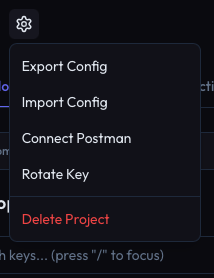
From any project in secr, open the settings menu and connect to Postman.
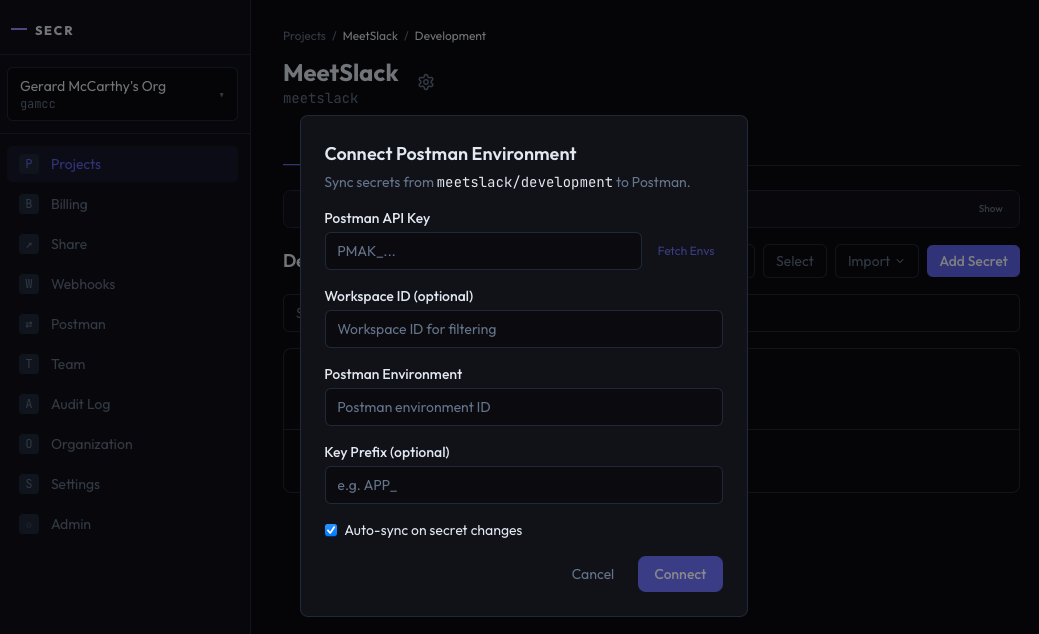
Enter your Postman API key, select the workspace and environment, and you're connected.
Secrets stay in sync automatically
Once connected, secr pushes secrets to your Postman environment every time something changes. Create a secret, update a value, rotate a key, promote from staging to production — the Postman environment updates in the background, automatically.
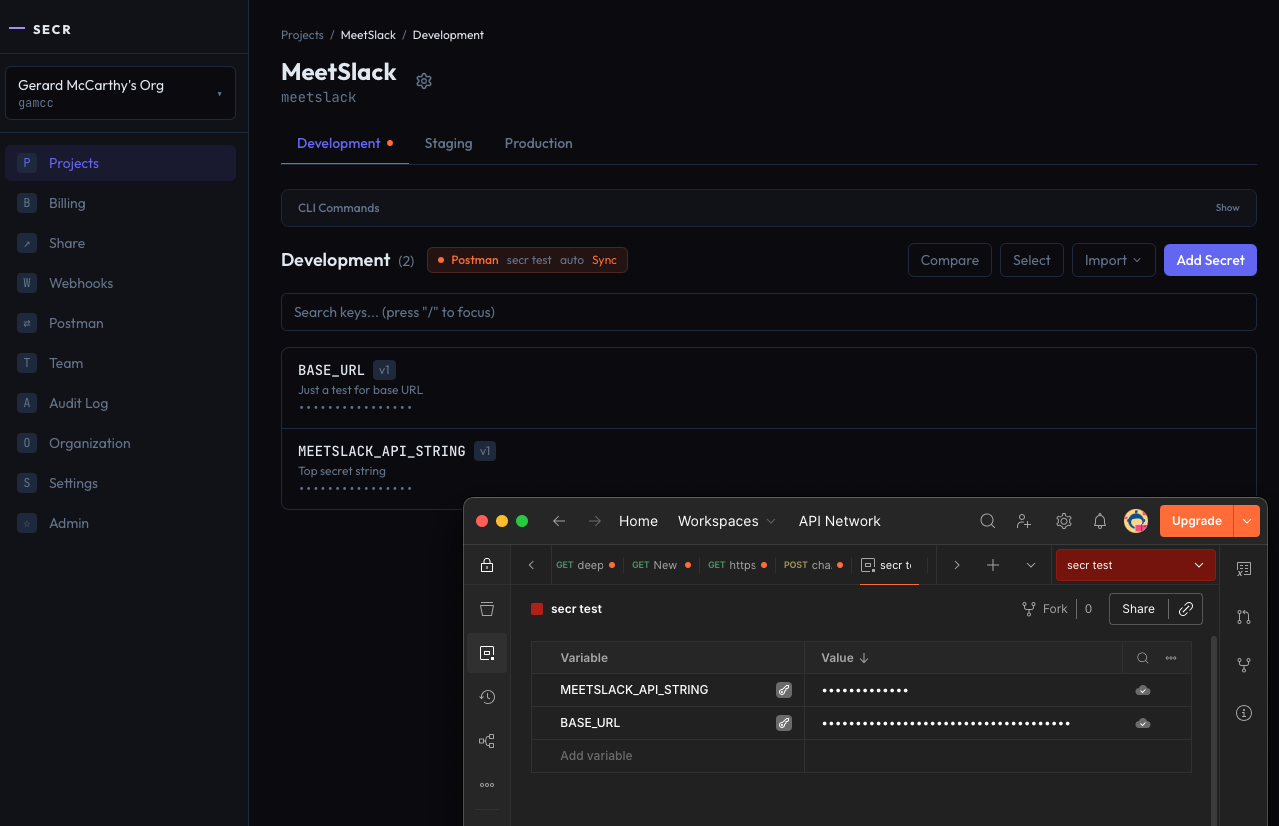
Your team doesn't need to do anything. They open Postman and the latest values are already there.
What this means for your team
For engineers: No more asking around for the latest API key. Open Postman, hit send. It works.
For team leads: When you rotate a key or update a third-party credential, you do it once in secr. Every Postman environment across your org updates automatically. No Slack messages, no runbooks, no "did everyone pull the latest env?"
For security and ops: Every secret change is logged in secr's audit trail. You know who changed what, when, and you can see that the change propagated to Postman. Secrets are masked in the Postman UI by default — they're marked as secret type variables, so they never appear in plain text in shared workspaces.
Built for organisations, not just solo developers
Most Postman integrations are built for a single developer exporting a file. secr's sync is built for teams:
-
Multiple syncs per org. Connect different projects and environments to different Postman environments. Your payments team can sync production keys to their API testing workspace while your platform team syncs staging to theirs.
-
Prefix filtering. If your project has 50 secrets but Postman only needs the 10 that start with
API_, set a prefix filter. You can even strip the prefix soAPI_STRIPE_KEYbecomesSTRIPE_KEYin Postman — matching whatever your collection expects. -
Auto-sync is the default. You can toggle it off for manual control, but the whole point is that your team never has to think about it.
-
Full audit trail. Every sync event — connect, disconnect, manual trigger, auto-sync — is logged. When compliance asks "who has access to production secrets?", you have a clear answer.
The CLI works too
Prefer the terminal? The CLI supports the full workflow:
# Connect a project to Postman (auto-sync enabled by default)
secr postman connect \
  --api-key pm_sa_xxxxx \
  --postman-env-id 12345-abcde

# Trigger a manual sync
secr postman sync

# Check sync status
secr postman status

# One-shot export (no connection needed, works on free tier)
secr postman export --env production --output postman.json
The export command is available on every plan — generate a Postman environment JSON from your secrets whenever you need it. The live sync feature is available on Pro and above.
CI/CD with Newman
If you're running Postman collections in CI with Newman, secr plugs right in:
secr postman export --env staging --output env.json
newman run collection.json -e env.json
No secrets in your CI config. No environment files committed to the repo. Just pull from secr and run.
secr's Postman API key is encrypted with AES-256-GCM using a dedicated data encryption key, wrapped by your KMS provider. It never exists in plain text in the database.
Getting started
If you're already using secr, you can connect to Postman right now — from the dashboard or the CLI.
If you're new to secr, the free tier includes Postman export. Create an account, push your secrets, and run secr postman export to generate your first environment file. When you're ready for auto-sync across your team, upgrade to Pro.
Stop sharing Postman environments over Slack. Create your account and connect your first project in under a minute.
Ready to get started?
Stop sharing secrets over Slack. Get set up in under two minutes.
Create your account